
Workday’s first-quarter results gave investors something they have been looking for: evidence that AI agents are starting to show up in adoption and commercial momentum.
The more interesting question is what happens next. Workday now has to prove that those agents can operate safely inside HR, finance, and public-sector workflows, where the margin for error is much lower than in a generic chatbot experience.
That makes the company’s recent agent announcements worth watching. Workday is not only selling AI as a new application category, it is testing where enterprise agents should live, which system should control them, and how much action they should be allowed to take before a human steps back in.
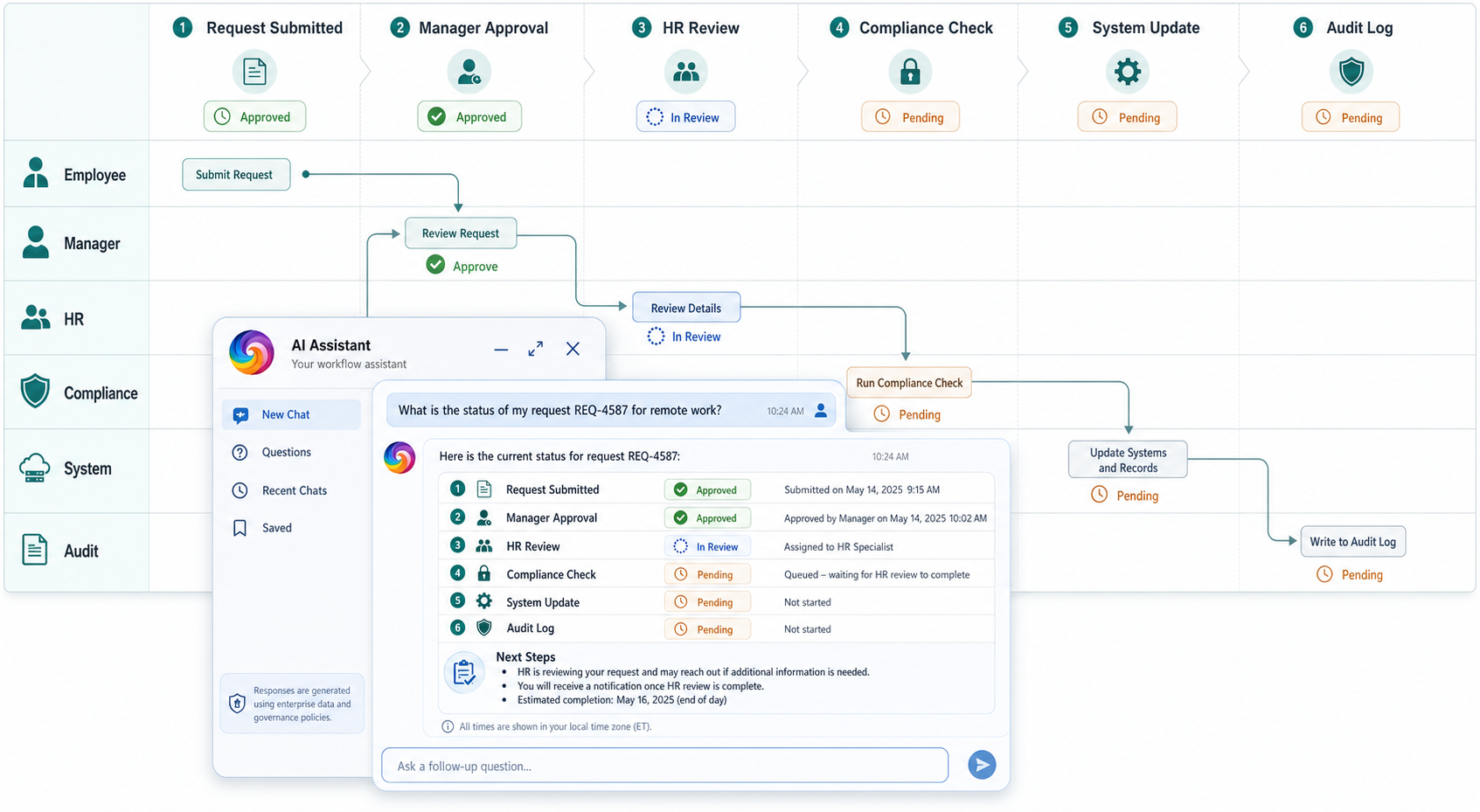
The distinction in practice means a conversational interface can answer questions, while an enterprise agent changes work. Once an agent can submit a leave request, approve a timesheet, trigger a personnel action, guide an expense process, or validate policy, the discussion shifts from usability to control.
The Interface Can Move; The Transaction Needs a Home
Workday’s Sana Self-Service Agent integration with Microsoft 365 Copilot shows where the user experience is heading. Employees and managers can ask HR and finance questions from Microsoft 365 and complete everyday tasks without returning to Workday’s own interface.
That fits how people actually work. Most employees do not want another portal. They want answers and actions inside the tools already open on their desktop.
For Workday, the strategic requirement is different. It needs the interaction to happen wherever employees are working while keeping the transaction anchored in Workday.
When a request involves Workday data or processes, Copilot connects to Sana Self-Service Agent, and the task is completed in Workday using the customer’s existing approvals, policies, permissions, and business rules. The Workday data and transactions remain in Workday, even if the prompt starts in Copilot.
That creates a useful line for enterprise software leaders. Interfaces can spread into productivity tools, but the system of control cannot become ambiguous. If Workday preserves that control layer, agents can extend its reach without weakening its role as the governed HR and finance core.
Sponsor Industry‑Grade Research
Public Sector HR Raises the Stakes
Workday Government’s Personnel Action Request (PAR) Agent takes the same strategy into a more sensitive environment.
Federal personnel actions are not simple self-service tasks. They cover hiring, promotions, reassignments, pay changes, and separations. They also feed payroll, benefits, audit records, and workforce planning.
Workday said routine personnel actions can take 22 to 45 days, while hiring and recruitment can take more than 80 to 120 days. The PAR Agent is expected to be available to Workday Government customers in 2027 and reportedly can reduce processing cycle times by up to 60%.
That is a meaningful productivity claim, but public-sector HR also brings a higher governance burden. Agencies need to know what the agent changed, why it changed it, which policy it applied, who approved the action, and where a human retained authority.
The public-sector use case exposes the real test for agentic ERP and HCM. Speed only helps if accountability holds. A faster personnel action that creates payroll errors, audit gaps, or fairness concerns would undercut the case for automation quickly.
Workday is betting that a unified HR and finance platform gives it the data structure and workflow control to manage that risk. The federal market will test whether that argument holds in one of the most process-heavy environments in enterprise software.
Get Our Free Weekly Newsletter
Agent Governance Is the Real Platform Test
Workday’s Agent System of Record points to a larger market shift. As agents move from assistants into workflow participants, customers need a way to manage them as governed enterprise actors.
That is different from managing applications, integrations, or human users. An agent may read data, make recommendations, initiate tasks, escalate exceptions, or interact with another system. It needs an owner, permissions, guardrails, monitoring, and a record of activity. It also needs boundaries that HR, finance, IT, legal, and risk teams can understand.
The practical question is not whether Workday can build agents. It is whether customers can govern agent behavior in processes where mistakes are expensive.
That means deciding which agents can only recommend, which can act after approval, and which can complete low-risk tasks automatically. Many AI programs will slow down at this point, because vendors can release agents faster than enterprises can define accountability models around them.
HR and finance leaders should resist broad agent rollouts until they understand how policies, permissions, audit trails, approvals, and exception handling work in practice.
What This Means for ERP Insiders
Agent adoption starts with workflow boundaries. ERP and HCM leaders should define which tasks agents can recommend, initiate, or complete before deployment expands. The safest early use cases will be high-volume workflows with clear policies, clean data, defined approval paths, and low ambiguity.
External AI interfaces need internal control points. Workday’s Sana integration with Microsoft 365 Copilot shows how enterprise work may increasingly begin outside the system of record. ERP teams should map which self-service workflows can move into productivity tools while keeping transactions, permissions, audit trails, and business rules anchored in the governed application.
Public-sector HR shows why governance cannot be added later. Workday’s PAR Agent targets a workflow where delays are costly, but mistakes can affect pay, benefits, compliance, and workforce planning. Agencies and implementation partners should define approval gates, exception ownership, and audit requirements before agents move from guidance into personnel action execution.